How to verify my Amazon account
In the digital age, security is the cornerstone of any online transaction. Whether you are a casual shopper looking for the latest gadgets or an aspiring entrepreneur setting up a storefront, you might find yourself asking: How to verify my Amazon account? This process is not just a bureaucratic hurdle; it is a vital layer of protection designed to safeguard your financial information, prevent identity theft, and ensure the integrity of the global marketplace.
In this extensive guide, we will walk through every nuance of the verification process, covering both buyer and seller perspectives, addressing common roadblocks, and providing expert tips to ensure your account remains in good standing.
Understanding the Necessity of Verification
Amazon utilizes sophisticated AI and manual review systems to monitor billions of transactions. When the system detects a new account, a change in login patterns, or the creation of a professional selling profile, it triggers a verification request. The primary goal is to confirm that the person behind the screen is who they claim to be.
For buyers, verification usually centers around payment methods and contact details. For sellers, the process is significantly more rigorous, involving tax identity, physical address validation, and government-issued identification.
Step-by-Step: How to Verify My Amazon Account as a Buyer
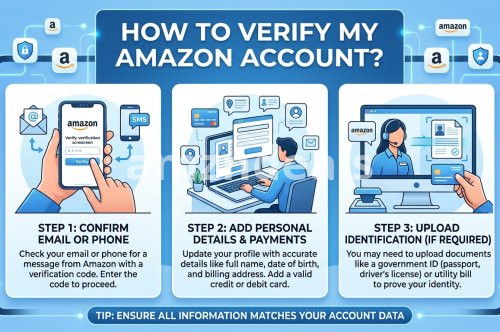
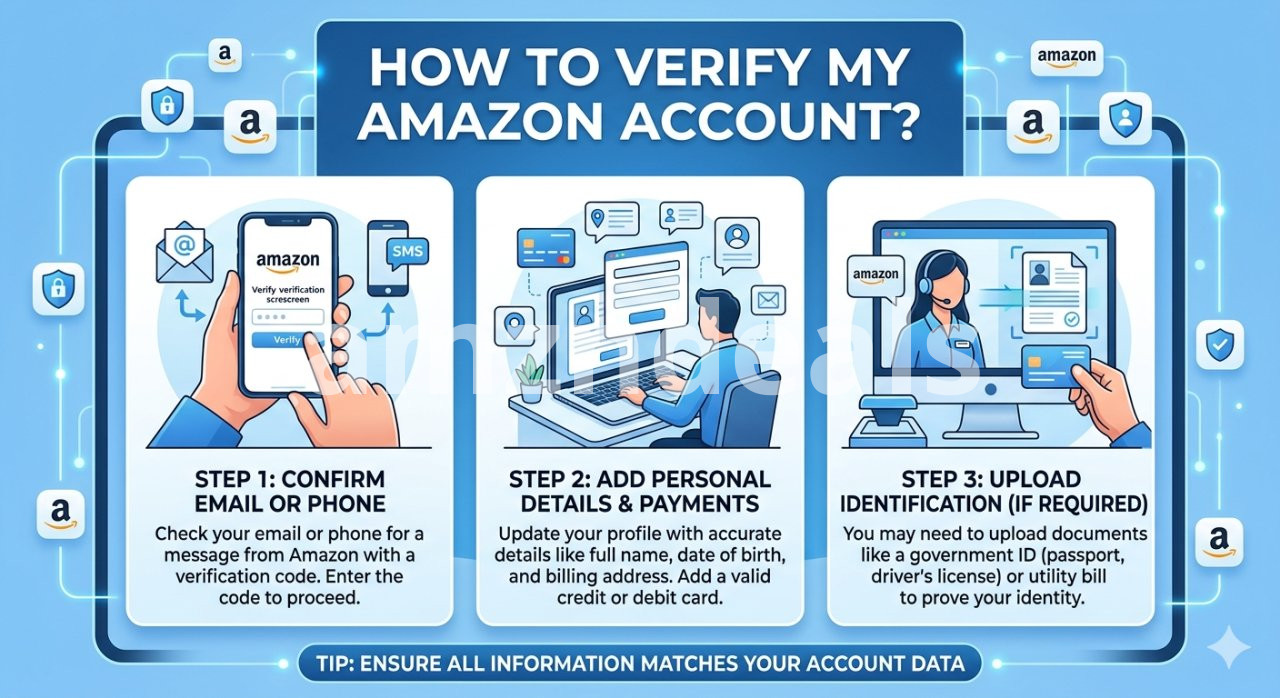
If you are a shopper, your verification is typically straightforward. Amazon needs to know your payment method is valid and that you have access to the email or phone number associated with the account.
1. Email and Phone Number Validation
Upon registration, Amazon sends a One-Time Password (OTP) to your email or mobile device.
Action: Enter the code immediately.
Pro Tip: Avoid using VOIP numbers (like Google Voice) for registration, as Amazon’s security filters sometimes flag these as high-risk.
2. Billing Address Matching
One of the most common reasons for account "holds" is a mismatch between your Amazon shipping address and the billing address registered with your bank.
Action: Ensure that the name and address on your Amazon "Payment Options" section exactly match your bank statement.
3. Two-Step Verification (2SV)
While optional, enabling 2SV is a form of ongoing verification that keeps your account secure.
Go to Account & Lists > Login & Security.
Click Turn On next to Two-Step Verification.
Choose between receiving SMS codes or using an authenticator app like Google Authenticator.
The Deep Dive: How to Verify My Amazon Account for Sellers
The stakes are higher for sellers. Amazon must comply with "Know Your Customer" (KYC) and "Anti-Money Laundering" (AML) laws. If you are wondering how to verify my Amazon account for a Seller Central profile, follow these stages carefully.
Phase 1: Gathering Your Documents
Before you even start the online form, have the following digital copies (PDF or high-quality JPEG) ready:
Government-Issued ID: A valid passport or a high-quality scan of your national ID/Driver’s License (both sides).
Bank/Credit Card Statement: Issued within the last 90 days, clearly showing your name and address.
Business License: If you are registering as a legal entity.
Phase 2: The Identity Verification (SIV) Process
Once you submit your application, Amazon will review your documents.
Consistency is Key: If your ID says "Jonathan A. Smith," do not type "John Smith" in the application. Even a missing middle initial can lead to a rejection.
Clarity: Ensure there is no glare on your ID card and that all four corners of the document are visible in the photo.
Phase 3: Address Verification via Postcard
In many regions, Amazon will mail a physical postcard containing a unique code to your registered business address.
This typically arrives within 5–7 business days.
Once received, log in to Seller Central and enter the code to verify your physical location.
Phase 4: Video Identity Verification
Recently, Amazon has introduced mandatory video calls. You will schedule a brief appointment with an Amazon associate.
During the call: You must show your original physical ID documents to the camera.
Environment: Ensure you are in a well-lit, quiet room with a stable internet connection.
Common Challenges and Troubleshooting
"I followed the steps, so why am I still asking how to verify my Amazon account?" If your verification is stuck, consider these common pitfalls:
Expired Documents: Ensure your passport or license hasn't expired.
Unsupported Languages: If your bank statement is in a language not supported by Amazon (e.g., Arabic or Thai), you must provide a certified English translation alongside the original.
Hidden Information: Do not redact (black out) information on your bank statement unless explicitly told to do so. Amazon needs to see the full document header.
Technical Glitches: Sometimes, clearing your browser cache or switching to Incognito mode can resolve upload errors.
Maintaining Your Verified Status
Verification isn't always a "one-and-done" deal. Amazon may re-verify your account if:
You change your primary disbursement bank account.
You update your legal business name or tax ID.
There is suspicious login activity from a different country.
To avoid disruptions, always keep your documentation updated in the Account Info section of your settings.
Frequently Asked Questions (FAQs)
Q1: How long does it take for Amazon to verify my account?
For buyers, verification is almost instantaneous. For sellers, the initial document review usually takes 2 to 5 business days. If a video call or physical postcard is required, the total time can extend to 2 weeks.
Q2: Can I verify my account without a credit card?
Amazon generally requires a "chargeable" credit card for sellers to verify their identity and cover potential fees. Prepaid cards are often rejected during the verification stage. Buyers can often use debit cards, but the billing address must still be verified.
Q3: What should I do if my verification is rejected?
Check your email for a specific reason from Amazon. Usually, it’s due to a blurry document or a name mismatch. Rectify the specific error and re-submit. Do not open a second account while the first is in the verification phase, as this can lead to a permanent ban for "Related Accounts."
Q4: Is it safe to upload my passport and bank statements to Amazon?
Yes. Amazon uses high-level encryption for document uploads. These documents are used strictly for identity verification purposes and are handled according to their privacy policy.
Q5: Why does Amazon ask for my tax information during verification?
Under US law (and similar laws in the EU/UK), Amazon is required to report certain seller earnings to tax authorities. Verifying your Taxpayer Identification Number (TIN) or Social Security Number (SSN) is a legal requirement for selling.
Q6: I am asking "how to verify my Amazon account" but I live outside the US. Is the process different?
The core principles remain the same, but you may need to provide a "Statement of Assets" or specific local government registration documents. Amazon provides a list of "Accepted Countries" for seller registration; ensure your country is on that list.
Final Thoughts on Account Security
Mastering the process of how to verify my Amazon account is the first major milestone in your journey as an Amazon user. For shoppers, it ensures that your orders are processed without delay. For sellers, it is the "gatekeeper" that, once passed, opens the door to one of the world's largest customer bases.
By being meticulous with your documentation, maintaining consistency in your data entry, and responding promptly to Amazon’s requests, you can navigate the verification maze with ease. Remember, these hurdles exist to keep the platform safe for everyone. Stay patient, stay organized, and you will have a fully verified, high-standing account in no time.
If you encounter persistent issues, always reach out to Amazon Customer Service or Seller Support directly, as they can provide specific insights into your account's status that automated systems might miss.